
Hi community,
My name is Helmut Wagensonner. I’m a Customer Engineer at Microsoft and this blog should help you to understand, which Administrative Templates (admx) to choose for your Windows 11 / Windows 10 mixed environment.
NOTE: The content of this article is only useful if you use ADMX file versions released before 21/07/23.
All the issues between the different ADMX versions mentioned in this blog have been fixed as of 21/07/23. You can now use the new Windows 11 ADMX files (download from Microsoft Download Center) to maintain Windows 11 and Windows 10 clients.
Also note that DataCollection.ADMX is a special case. See here ADMX DataCollection Policy CSP, here Changes to Windows diagnostic data collection and the blue box below for further information.
NOTE: The telemetry settings (DataCollection.admx) have been changed and renamed in Windows 11. Following table shows the Win10 settings and their corresponding Win11 terms.
| Windows 10 ADMX – Allow Telemetry | Windows 11 ADMX – Allow Diagnostic Data |
| 0-Security | Diagnostic Data Off |
| 1-Required | Send required Diagnostic Data |
| 2-Enhanced | [not present] |
| 3-Optional | Send Optional Diagnostic Data |
Clients, which are configured to “2-Enhanced” using the Windows 10 settings, will automatically drop back to “Send required Diagnostic Data” in Windows 11.
First of all let me say that both versions of the ADMX templates mentioned below, can be used with Windows 10 as well as with Windows 11. They are indentical except very few settings. This article is only about how to configure a setting, which is missing in one of the templates. Once configured your GPOs will work on both operating systems.
As long as we support Windows 10 it could occur that new Windows 10 features are not reflected in Windows 11 ADMX files and vice versa. The table at the end of this article shows differences between the Win10 and Win11 templates (as of Dec 16, 2021).
So what to do if you have a mixed environment of both client operating systems? Well, fact is that you can only copy one set of ADMX files to your Active Directory’s Central Store. Depending on what your future plans are, you should decide which templates fit best. If you plan to stay on Windows 10 for a while, you should choose the Windows 10 ADMX files. If you’re ready to upgrade to Windows 11 and this will become your dominating OS version (or it already is), you should copy the Windows 11 ADMX files to your Central Store.
But can you configure new Windows 10 policies if your central store contains the Windows 11 ADMX files? Well, you can! You just need to do this from a separate client. The steps below explain the approach.
- Install a client with Windows 10 21H2 (important!) operating system and join it to your domain.
- Log on with an user with administrative rights.
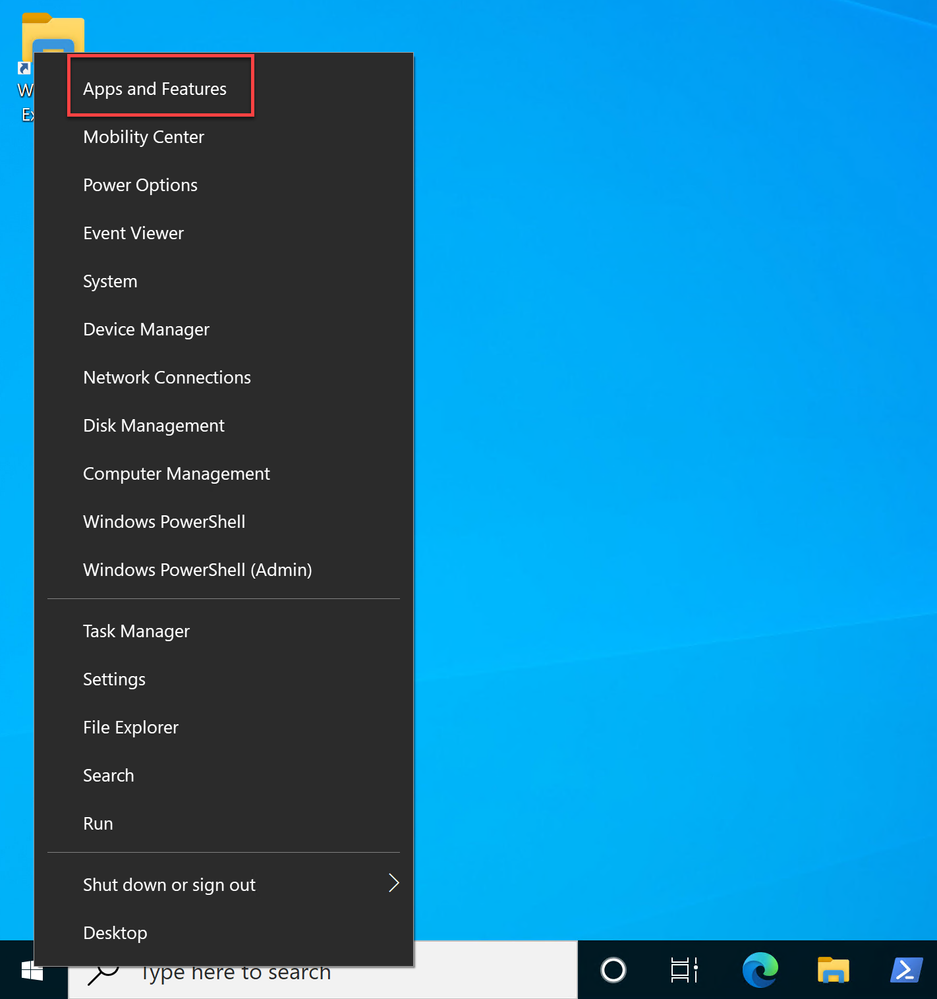
- Right-click on your start menu and choose “Apps and Features”

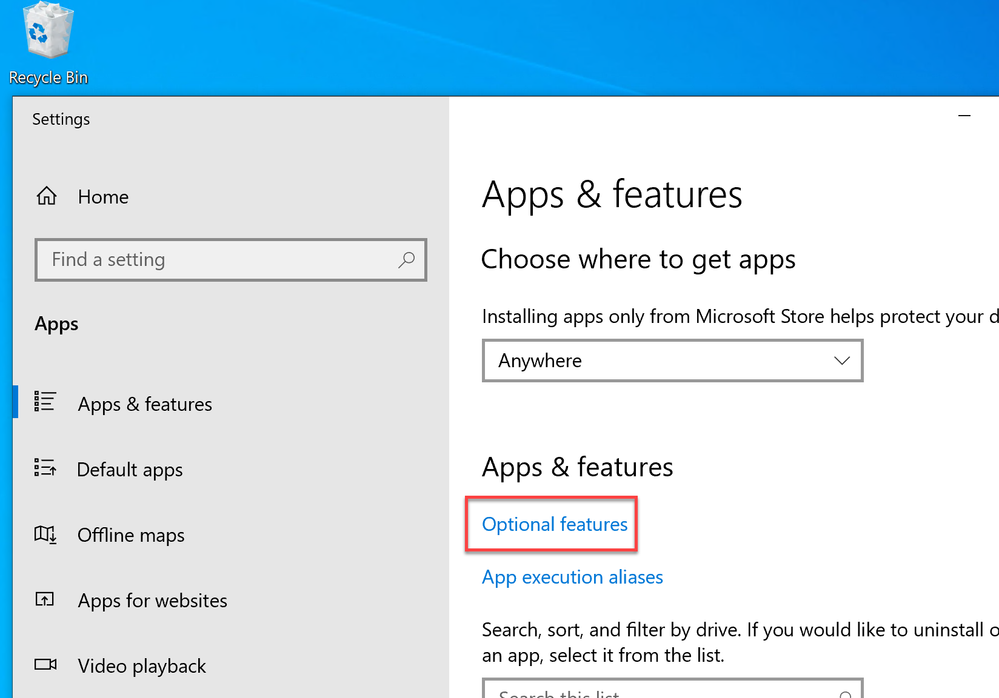
- Choose “Optional Features”
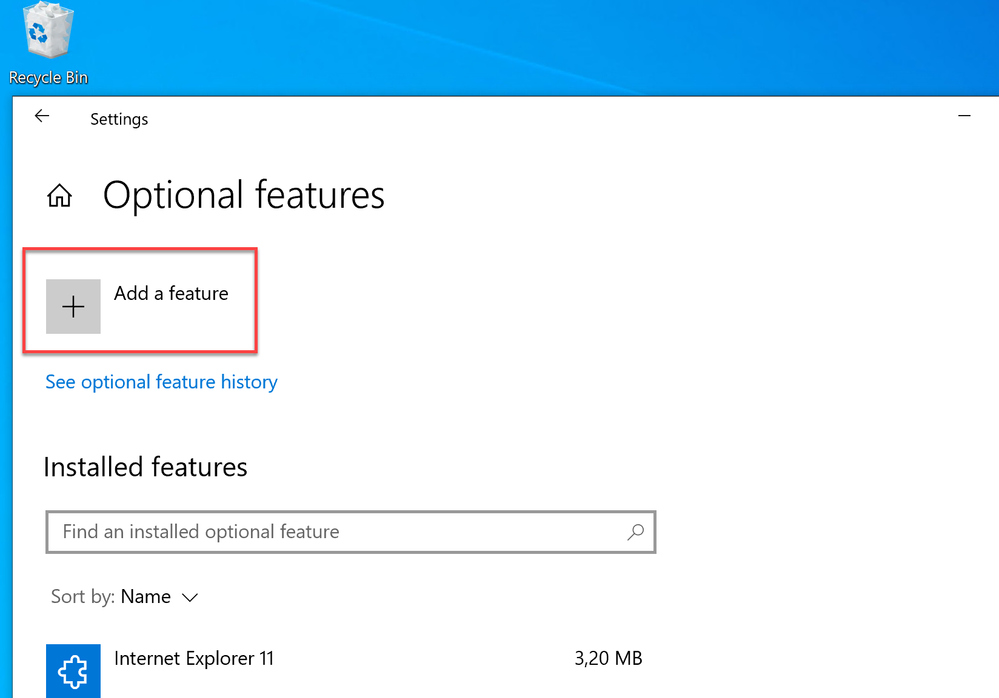
- Choose “Add a Feature”
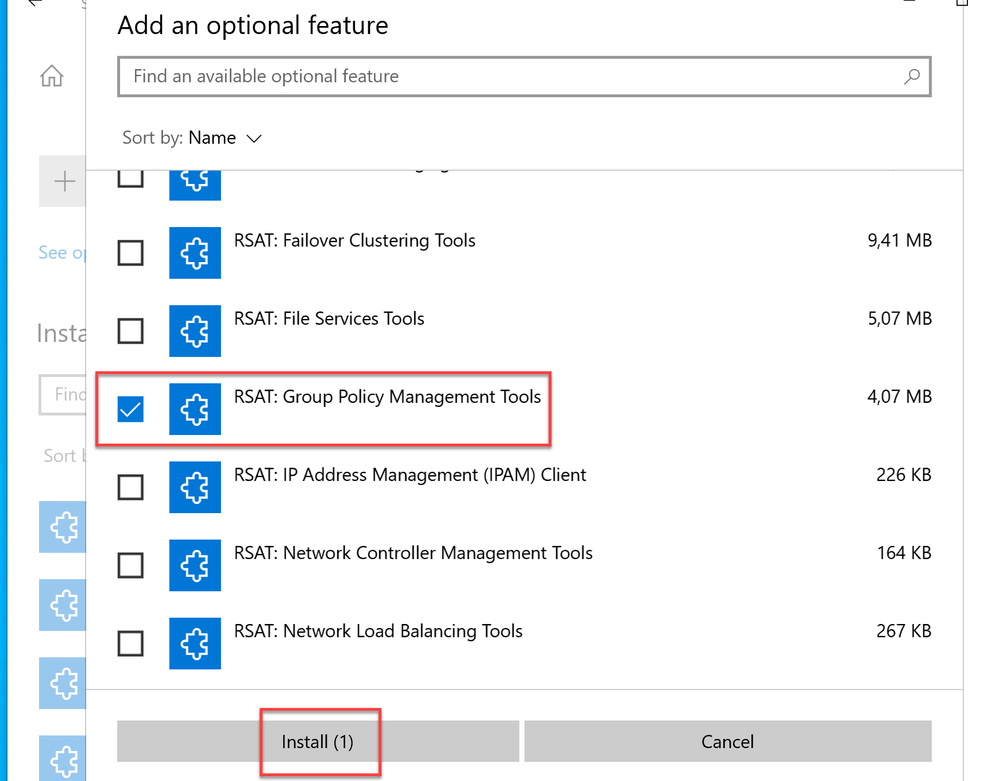
- Search for “RSAT: Group Policy Management Tools” and click the “Install” button.
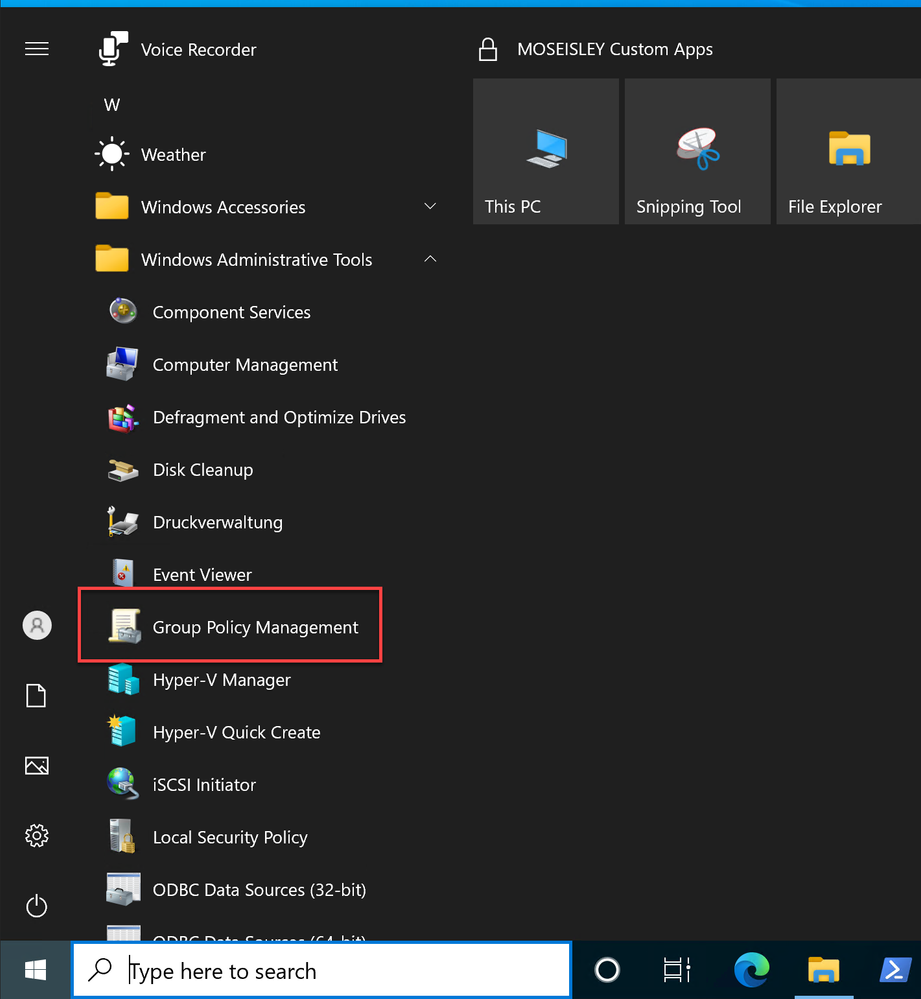
- After successful installation you will find a “Group Policy Management” item in the “Windows Administrative Tools” folder in your start menu.
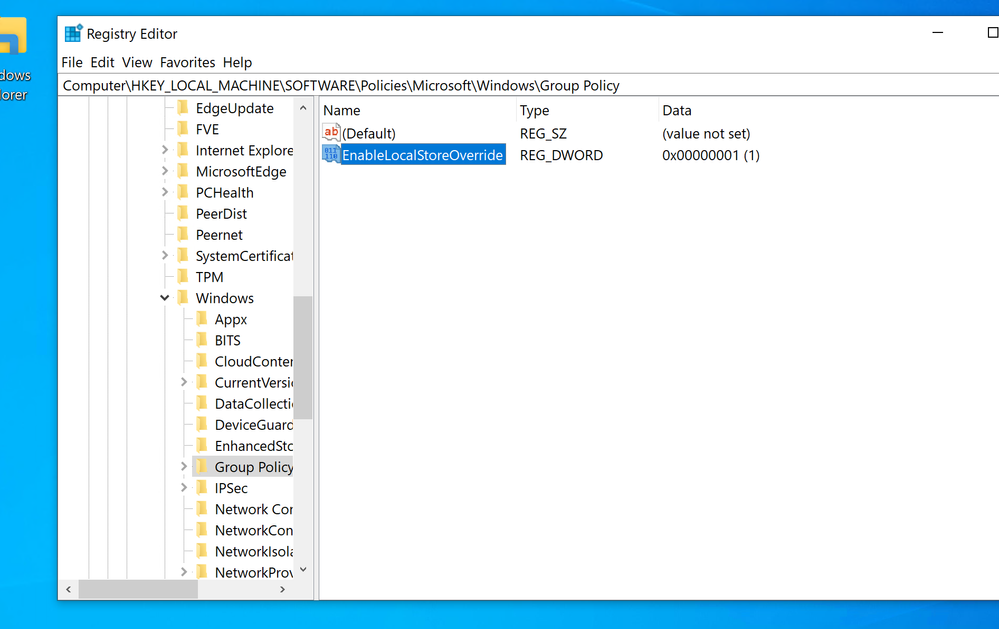
- Open your Registry Editor and add following registry value:
Key: HKEY_LOCAL_MACHINE\SOFTWARE\Policies\Microsoft\Windows\Group Policy
Value: EnableLocalStoreOverride
Type: REG_DWORD
Data: 1 - Restart your computer and log on with a user account that has the right to edit domain Group Policy objects.
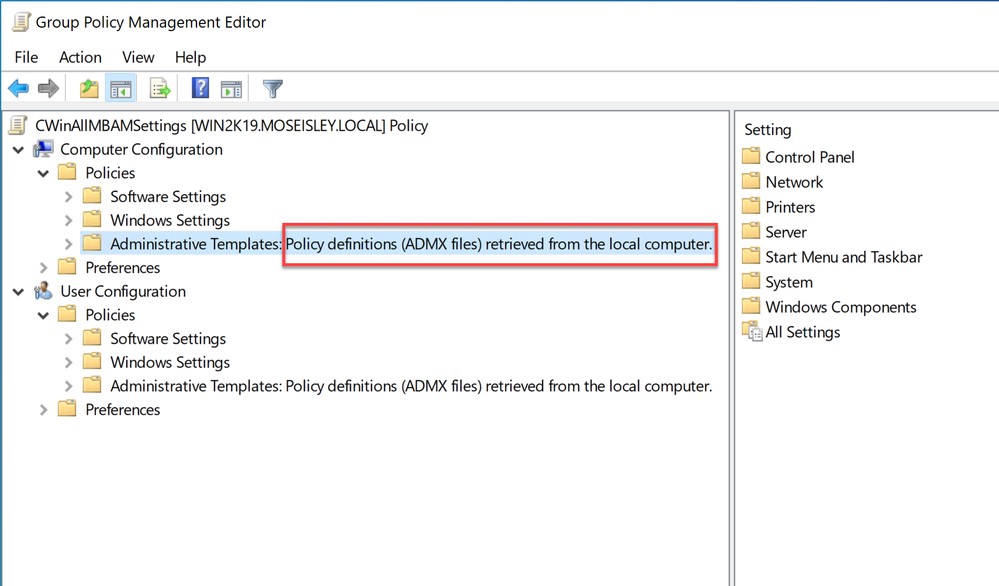
- Run the “Group Policy Management” from your start menu and open the desired GPO for edit. The Administrative Templates should now be taken from the client’s local store instead of the central store.
Following table illustrates differences between Windows 10 21H2 and Windows 11 21H2 ADMX files.
| ADMX name | Scope | Setting | Available only in |
| AppPrivacy | Computer | Let Windows apps take screenshots of various windows or displays | Windows 11 |
| AppPrivacy | Computer | Let Windows apps turn off the screenshot border | Windows 11 |
| AppxPackageManager | Computer | Archive infrequently used apps | Windows 11 |
| AppxPackageManager | Computer | Do not allow sideloaded apps to auto-update in the background | Windows 11 |
| AppxPackageManager | Computer | Do not allow sideloaded apps to auto-update in the background on a metered network | Windows 11 |
| CloudContent | Computer | Turn off cloud consumer account state content | Windows 11 |
| CloudContent | User | Turn off Spotlight collection on Desktop | Windows 11 |
| ControlPanelDisplay | Computer | Prevent lock screen background motion | Windows 11 |
| DataCollection | Computer | Limit Diagnostic Log Collection | Windows 11 |
| DataCollection | Computer | Limit Dump Collection | Windows 11 |
| DeliveryOptimization | Computer | Discovery Mode: Local Discovery | Windows 11 |
| DnsClient | Computer | Configure DNS over HTTPS (DoH) name resolution | Windows 11 |
| EAIME | User | Configure Korean IME version | Windows 11 |
| FileSys | Computer | Enable NTFS non-paged pool usage | Windows 11 |
| FileSys | Computer | NTFS parallel flush threshold | Windows 11 |
| FileSys | Computer | NTFS parallel flush worker threads | Windows 11 |
| FileSys | Computer | Configure NTFS default tier | Windows 11 |
| Globalization | Both | Restrict Language Pack and Language Feature Installation | Windows 11 |
| InetRes | Both | Replace JScript by loading JScript9Legacy in place of JScript via MSHTML/WebOC. | Windows 11 |
| Netlogon | Computer | Use lowercase DNS host names when registering domain controller SRV records | Windows 11 |
| NewsAndInterests | Computer | Allow News and Interests | Windows 11 |
| Sam | Computer | Configuration settings for the Security Account Manager | Windows 11 |
| Sensors | Computer | Force instant Wake | Windows 11 |
| Sensors | Computer | Force instant Lock | Windows 11 |
| Sensors | Computer | Configure Lock Timeout | Windows 11 |
| StartMenu | Both | Locked Start Layout: Re-Apply Layout at every logon | Windows 11 |
| StartMenu | Both | Show or hide “Most used” list from Start menu | Windows 11 |
| TaskBar | Computer | Configure the Chat icon on the taskbar | Windows 11 |
| TenantRestrictions | Computer | Configure Cloud Policy Details | Windows 11 |
| TerminalServer | Computer | Enable auto-subscription | Windows 11 |
| TerminalServer | Computer | Do not allow location redirection | Windows 11 |
| TerminalServer | Computer | Allow UI Automation redirection | Windows 11 |
| WindowsDefender | Computer | Configure scheduled task times randomization window | Windows 11 |
| WindowsDefender | Computer | Define the directory path to copy support log files | Windows 11 |
| WindowsDefender | Computer | Configure IP Address Exclusions | Windows 11 |
| WindowsDefender | Computer | Turn on script scanning | Windows 11 |
| WindowsDefender | Computer | Allow Microsoft Defender Antivirus to update and communicate over a metered connection | Windows 11 |
| WindowsDefender | Computer | Configure Network Protection to be allowed to be configured into block or audit mode on Windows Server | Windows 11 |
| WindowsDefender | Computer | Control datagram processing for network protection | Windows 11 |
| Sandbox | Computer | Allow vGPU sharing for Windows Sandbox | Windows 11 |
| Sandbox | Computer | Allow networking in Windows Sandbox | Windows 11 |
| Sandbox | Computer | Allow audio input in Windows Sandbox | Windows 11 |
| Sandbox | Computer | Allow video input in Windows Sandbox | Windows 11 |
| Sandbox | Computer | Allow printer sharing with Windows Sandbox | Windows 11 |
| Sandbox | Computer | Allow clipboard sharing with Windows Sandbox | Windows 11 |
| WindowsUpdate | <Changes in folder structure> | Windows 11 |
| ADMX name | Scope | Setting | Available only in |
| DataCollection | Both | Allow Telemetry: Enhanced | Windows 10 |
| DeliveryOptimization | Computer | Download Mode: Bypass | Windows 10 |
| EAIME | User | Turn on Live Sticker | Windows 10 |
| EAIME | User | Turn on lexicon update | Windows 10 |
| InetRes | Both | Turn off Adobe Flash in Internet Explorer and prevent applications from using Internet Explorer technology to instantiate Flash objects | Windows 10 |
| InetRes | Both | Reset zoom to default for HTML dialogs in Internet Explorer mode | Windows 10 |
| MicrosoftEdge | Both | Suppress the display of Edge Deprecation Notification | Windows 10 |
| Printing | Computer | Limit print driver installation to Administrators | Windows 10 |
| TerminalServer | Computer | Set the Remote Desktop licensing mode: AAD per User | Windows 10 |
| WindowsDefender | Computer | Scan packed executables | Windows 10 |
Further resources you might find useful:
- GPO Settings Reference Spreadsheet for Windows 10 21H2
- GPO Settings Reference Spreadsheet for Windows 11 21H2
- ADMX templates for Windows 10 21H2
- ADMX templates for Windows 11 21H2
Edit 03/02/22: Please note that the list of differences shown above may not be complete. This is just a guiding reference. Also, there may be updated ADMX versions, which change the number of differences between Windows 10 and Windows 11 ADMX in either way. The table above shows differences at time of writing this article.
Edit: 07/02/22: Re-wrote some parts of the article because it could be misunderstood.
Edit: 21/07/23: All differences have been compensated now. See blue box on top for more details.
Updated Jul 26, 2023 Version 8.0