
Hi community,
I am Helmut Wagensonner, a Cloud Solution Architect – Engineer at Microsoft. In a former blog (https://techcommunity.microsoft.com/t5/core-infrastructure-and-security/windows-10-or-windows-11-gpo-admx-which-one-to-use-for-your/ba-p/3063322), where I did a comparison between Windows 10 and Windows 11 ADMX files, I promised in my comments to do a follow-up when both 22H2 ADMX versions are finalized.
NOTE: The content of this article is only valid if you use ADMX file versions released before 21/07/23.
All the issues between the different ADMX versions mentioned in this blog have been fixed as of 21/07/23. See main post HERE for further information.
A couple of weeks after the ADMX files for both versions were available for download, I did another comparison. I used the Windows 10 October 2022 ADMX files vs. Windows 11 September 2022 templates. Still, we have differences between the two versions. I did not compare the diffs from the old blog with the current ones, so I cannot tell if the number of distinctions has increased, but after a short peek it seems that not too much has changed. I did a file comparison of both versions and created an Excel table, which is partly reflected in the table further down below this article.
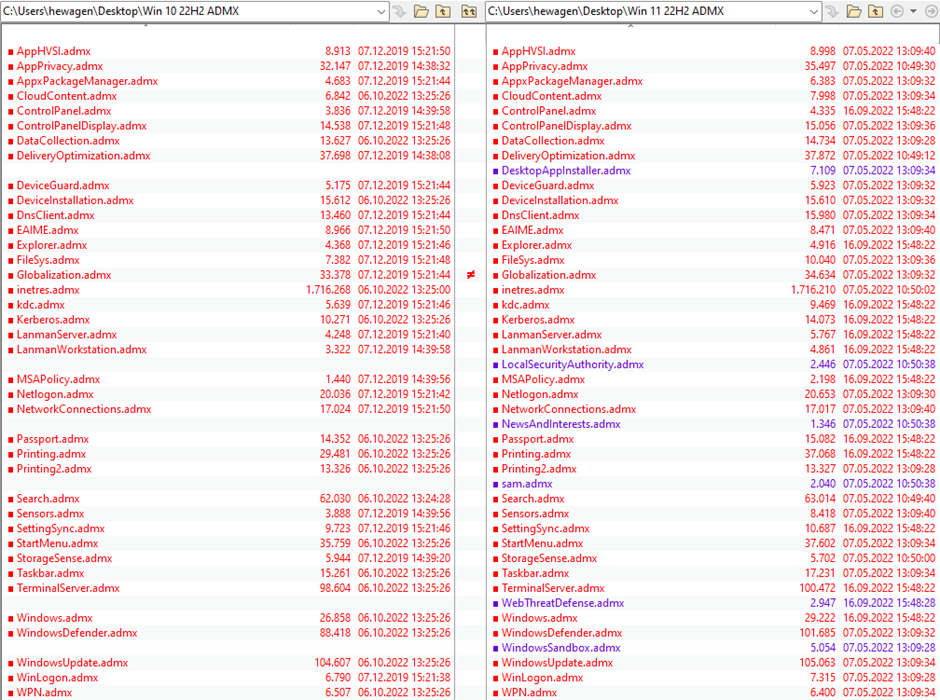
Some settings shown in the table below are sub-settings or options. I added the parent setting name where it made sense, so that you can imagine where it belongs to. In a few cases only the name or the description of an existing setting has changed. For example: In the AppHvsi.adml the help text has been extended by two words.

Small modifications or plain text modifications like those are not considered in the table below. Other than the first comparison I did not distinguish between user or computer settings anymore.
| Display Name | Name (en-us) | Win 10 | Win 11 | ADMX |
| LetAppsAccessGraphicsCaptureProgrammatic_Name | Let Windows apps take screenshots of various windows or displays | x | AppPrivacy.admx | |
| LetAppsAccessGraphicsCaptureWithoutBorder_Name | Let Windows apps turn off the screenshot border | x | AppPrivacy.admx | |
| AllowAutomaticAppArchiving | Archive infrequently used apps | x | AppxPackageManager.admx | |
| DisableBackgroundAutoUpdates | Not allow sideloaded apps to auto-update in the background | x | AppxPackageManager.admx | |
| DisableMeteredNetworkBackgroundAutoUpdates | Not allow sideloaded apps to auto-update in the background on a metered network | x | AppxPackageManager.admx | |
| DisableSpotlightCollectionOnDesktop | Turn off Spotlight collection on Desktop | x | CloudContent.admx | |
| DisableConsumerAccountStateContent | Turn off cloud consumer account state content | x | CloudContent.admx | |
| HideUnsupportedHardwareNotifications | Hide messages when Windows system requirements are not met | x | ControlPanel.admx | |
| CPL_Personalization_AnimateLockScreenBackground | Prevent lock screen background motion | x | ControlPanelDisplay.admx | |
| AllowTelemetry_2 | Allow telemetry – 2 Enhanced | x | DataCollection.admx | |
| LimitDiagnosticLogCollection | Limit Diagnostic Log Collection | x | DataCollection.admx | |
| LimitDumpCollection | Limit Dump Collection | x | DataCollection.admx | |
| RestrictPeerSelectionBy_LinkLocal | Restrict Peer Collection to Local Discovery | x | DeliveryOptimization.admx | |
| <COMPLETE ADMX File> | x | DesktopAppInstaller.admx | ||
| KernalShadowStacksLaunch | Virtualization Based Security: Kernel-mode Hardware-enforced Stack Protection | x | DeviceGuard.amdx | |
| DNS_Doh | Configure DNS over HTTPS (DoH) name resolution | x | DnsClient.admx | |
| DNS_Ddr | Configure Discovery of Designated Resolvers (DDR) protocol | x | DnsClient.admx | |
| DNS_Netbios | Configure NetBIOS settings | x | DnsClient.admx | |
| L_TurnOnLiveSticker | Turn on Live Sticker | x | EAIME.admx | |
| L_TurnOnLexiconUpdate | Turn on lexicon update | x | EAIME.admx | |
| L_ConfigureKoreanImeVersion | Configure Korean IME version | x | EAIME.admx | |
| DisableGraphRecentItems | Turn off files from Office.com in Quick access view | x | Explorer.admx | |
| NtfsForceNonPagedPoolAllocation | Enable NTFS non-paged pool usage | x | FileSys.admx | |
| NtfsParallelFlushThreshold | NTFS parallel flush threshold | x | FileSys.admx | |
| NtfsParallelFlushWorkers | NTFS parallel flush worker threads | x | FileSys.admx | |
| NtfsDefaultTier | NTFS default tier | x | FileSys.admx | |
| RestrictLanguagePacksAndFeaturesInstall | Restrict Language Pack and Language Feature Installation | x | Globalization.admx | |
| DisableIEAppDeprecationNotification | Hide Internet Explorer 11 retirement notification | x | Inetres.admx | |
| JScriptReplacement | Replace JScript by loading JScript9Legacy in place of JScript via MSHTML/WebOC. | x | Inetres.admx | |
| PKINITHashAlgorithmConfiguration | Configure hash algorithms for certificate logon | x | Kdc.admx | |
| PKInitHashAlgorithmConfiguration | Configure hash algorithms for certificate logon | x | Kerberos.admx | |
| Pol_EnableCompressedTraffic_Name | Request traffic compression for all shares | x | LanmanServer.admx | |
| Pol_DisableCompression_Name | Disable SMB compression | x | LanmanServer.admx | |
| Pol_EnableCompressedTraffic_Name | Request traffic compression for all shares | x | LanmanWorkstation.admx | |
| Pol_DisableCompression_Name | Disable SMB compression | x | LanmanWorkstation.admx | |
| <COMPLETE ADMX File> | x | LocalSecurityAuthority.admx | ||
| MicrosoftAccount_RestrictToEnterpriseDeviceAuthenticationOnly | Only allow device authentication for the Microsoft Account Sign-In Assistant | x | MSAPolicy.admx | |
| Netlogon_DnsSrvRecordUseLowerCaseHostNames | Use lowercase DNS host names when registering domain controller SRV records | x | Netlogon.admx | |
| <COMPLETE ADMX File> | x | NewsAndInterests.admx | ||
| MSPassport_EnableEnhancedSignInSecurity | Enable ESS with Supported Peripherals | x | Passport.admx | |
| CopyFilesPolicy | Manage processing of Queue-specific files | x | Printing.admx | |
| DriverValidationLevel | Manage Print Driver signature validation | x | Printing.admx | |
| DriverExclusionList | Manage Print Driver exclusion list | x | Printing.admx | |
| RpcListenerPolicy | Configure RPC listener settings | x | Printing.admx | |
| RpcConnectionPolicy | Configure RPC connection settings | x | Printing.admx | |
| RpcTcpPortPolicy | Configure RPC over TCP port | x | Printing.admx | |
| AlwaysSendIppPageCounts | Always send job page count information for IPP printers | x | Printing.admx | |
| <COMPLETE ADMX File> | x | Sam.admx | ||
| DisableSearch_DisplayName | Fully disable Search UI | x | Serach.admx | |
| ForceInstantWake_DisplayName | Force Instant Wake | x | Sensors.admx | |
| ForceInstantLock_DisplayName | Force Instant Lock | x | Sensors.admx | |
| ForceLockTimeout_DisplayName | Lock Timeout | x | Sensors.admx | |
| ForceInstantDim_DisplayName | Force Instant Dim | x | Sensors.admx | |
| DisableAccessibilitySettingSync | Do not sync accessibility settings | x | SettingSync.admx | |
| LockedStartLayout_ReapplyEveryLogon | Reapply layout at every logon | x | StartMenu.admx | |
| HideRecommendedSection | Remove Recommended section from Start Menu | x | StartMenu.admx | |
| SimplifyQuickSettings_DisplayName | Simplify Quick Settings Layout | x | StartMenu.admx | |
| DisableEditingQuickSettings_DisplayName | Disable Editing Quick Settings | x | StartMenu.admx | |
| DisableControlCenter | Remove Quick Settings | x | StartMenu.admx | |
| ConfigureChatIcon | Configures the Chat icon on the taskbar | x | Taskbar.admx | |
| HideTaskViewButton | Hide the TaskView button | x | Taskbar.admx | |
| TS_LICENSING_MODE_AAD_PER_USER | Set the Remote Desktop licensing mode: AAD per User | x | TerminalServer.admx | |
| TS_LOCATION_REDIRECTION | Do not allow location redirection | x | TerminalServer.admx | |
| TS_UIA | Allow UI Automation redirection | x | TerminalServer.admx | |
| TS_CLIPRDR_CLOUD_CLIP_INTEGRATION | Disable Cloud Clipboard integration for server-to-client data transfer | x | TerminalServer.admx | |
| <COMPLETE ADMX File> | x | WebThreadDefense.admx | ||
| Features_DeviceControlEnabled | Enable or Disable Defender Device Control on this machine. | x | WindowsDefender.admx | |
| DeviceControl_DefaultEnforcement | Select Device Control Default Enforcement Policy | x | WindowsDefender.admx | |
| DeviceControl_DataDuplicationRemoteLocation | Define Device Control evidence data remote location | x | WindowsDefender.admx | |
| SchedulerRandomizationTime | Configure scheduled task times randomization window | x | WindowsDefender.admx | |
| SupportLogLocation | Define the directory path to copy support log files | x | WindowsDefender.admx | |
| Root_PlatformUpdateChannel | Select the channel for Microsoft Defender monthly platform updates | x | WindowsDefender.admx | |
| Root_EngineUpdateChannel | Select the channel for Microsoft Defender monthly engine updates | x | WindowsDefender.admx | |
| Root_SecurityIntelligenceUpdateChannel | Select the channel for Microsoft Defender daily security intelligence updates | x | WindowsDefender.admx | |
| Exclusions_IpAddresses | Ip Address Exclusions | x | WindowsDefender.admx | |
| RealtimeProtection_DisableSriptScanning | Turn on script scanning | x | WindowsDefender.admx | |
| Reporting_ServiceHealthReportInterval | Configure time interval for service health reports | x | WindowsDefender.admx | |
| Scan_ThrottleForScheduledScanOnly | CPU throttling type | x | WindowsDefender.admx | |
| Scan_DisablePackedExeScanning | Scan packed executables | x | WindowsDefender.admx | |
| MeteredConnectionUpdates | Allows Microsoft Defender Antivirus to update and communicate over a metered connection. | x | WindowsDefender.admx | |
| AllowNetworkProtectionOnWinServer | Configure Network Protection into block or audit mode on Windows Server. | x | WindowsDefender.admx | |
| DisableDatagramProcessing | This setting controls datagram processing for network protection. | x | WindowsDefender.admx | |
| MpEngine_DisableGradualRelease | Disable gradual rollout of Microsoft Defender updates. | x | WindowsDefender.admx | |
| <COMPLETE ADMX File> | x | WindowsSandbox.admx | ||
| <STRUCTURE/CATEGORY CHANGE ONLY> | x | WindowsUpdate.admx | ||
| EnableMPRNotifications | Enable MPR notifications for the system | x | WinLogon.admx | |
| WnsEndpoint | Turn off notification mirroring: FQDN for WNS | x | Wpn.admx | |
| ExpandedToastNotifications | Turn on multiple expanded toast notifications in action center | x | Wpn.admx |
For your convenience, I also uploaded this table in Excel format, where you can sort and filter columns.
Regarding the future design of the Windows Client ADMX files: I cannot tell if the GPO settings for Windows 10 and Windows 11 versions will ever be merged to one set. The product group is still working on this issue but since Windows 10 runs out of support on October 2025, it could happen, that we will have to deal with this until Win 10 EOL. However, this is just my opinion, not an official statement.
Please note: In this article I do not repeat the “How-To” from the first blog as this is only an update. If you don’t know what to do with your central store in a mixed environment, have a look at the blog mentioned at the beginning of this article. Generally, I suggest to go with Windows 11 ADMX now, since there are < 10 settings, which are only available in Window 10 definition files.
There will not be any further comparisons from my side because I already found other sources on the internet doing this. Also, keep in mind that ADMX files can be updated from time to time when new features are made available through periodic updates (https://support.microsoft.com/en-us/windows/delivering-continuous-innovation-in-windows-11-b0aa0a27-ea9a-4365-9224-cb155e517f12). This can happen asynchronously between the two Windows versions.
That said, let me clarify that I cannot guarantee the integrity of all the differences mentioned in this post but you can easily do this comparison on your own by downloading and extracting the two ADMX sets (see links below) and compare them using any file and folder comparison tool (i.e. Beyond Compare).
Stay healthy and all the best…
Download Windows 10 22H2 ADMX files
Download Windows 11 22H2 ADMX files
Updated Jul 22, 2023
Version 2.0