
Option 1: Update the Existing Coverage Workbook
Enhance the current workbook by adding a query that checks Defender for AI plan enablement across subscriptions.
Steps
- Open the Coverage Workbook in Defender for Cloud.
- Edit the workbook and update the query section to include the line below.
AIServices = defenderPlans.AI
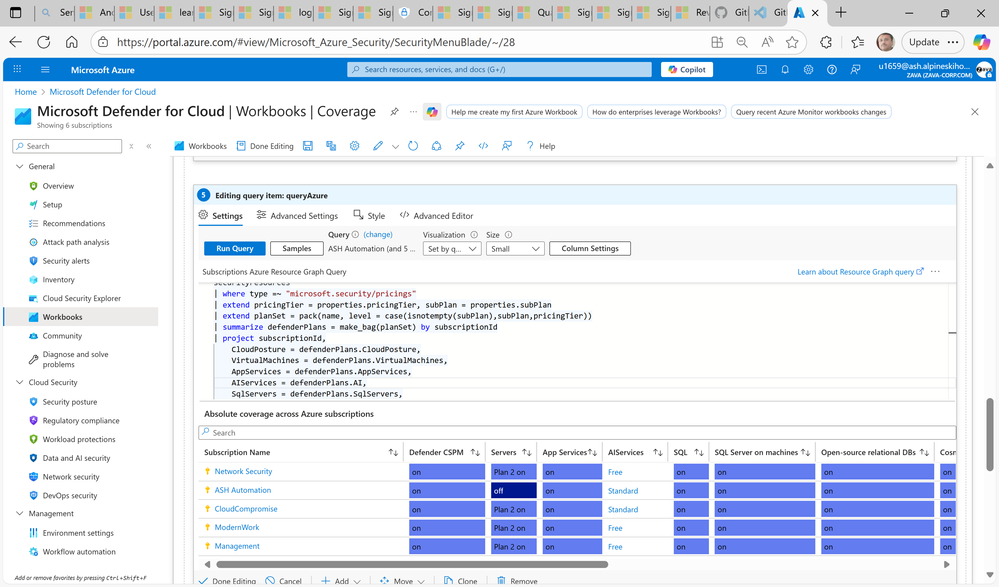
- Display the results in a table or chart alongside other Defender plans.
- Save and publish the updated workbook for organization-wide visibility.
Pros
- Single pane of glass for all Defender coverage.
- Easy for SOC teams already using the workbook.
Cons
- Requires manual customization and maintenance.
- Updates may be overwritten during workbook template refresh.
Option 2: Use Azure Resource Graph Explorer
Run a Resource Graph query to check Defender for AI enablement status across multiple subscriptions without modifying the workbook.
Steps
- Go to Azure Resource Graph Explorer in the Azure portal.
- Run the following query:
__________________________________________________________________________________
securityresources
| where type =~ “microsoft.security/pricings”
| extend pricingTier = properties.pricingTier, subPlan = properties.subPlan
| extend planSet = pack(name, level = case(isnotempty(subPlan),subPlan,pricingTier))
| summarize defenderPlans = make_bag(planSet) by subscriptionId
| project subscriptionId,
CloudPosture = defenderPlans.CloudPosture,
VirtualMachines = defenderPlans.VirtualMachines,
AppServices = defenderPlans.AppServices,
AIServices = defenderPlans.AI,
SqlServers = defenderPlans.SqlServers,
SqlServerVirtualMachines = defenderPlans.SqlServerVirtualMachines,
OpenSourceRelationalDatabases = defenderPlans.OpenSourceRelationalDatabases,
CosmosDB = defenderPlans.CosmosDbs,
StorageAccounts = defenderPlans.StorageAccounts,
Containers = defenderPlans.Containers,
KeyVaults = defenderPlans.KeyVaults,
Arm = defenderPlans.Arm,
DNS = defenderPlans.Dns,
KubernetesService = defenderPlans.KubernetesService,
ContainerRegistry = defenderPlans.ContainerRegistry
The output appears as shown below.
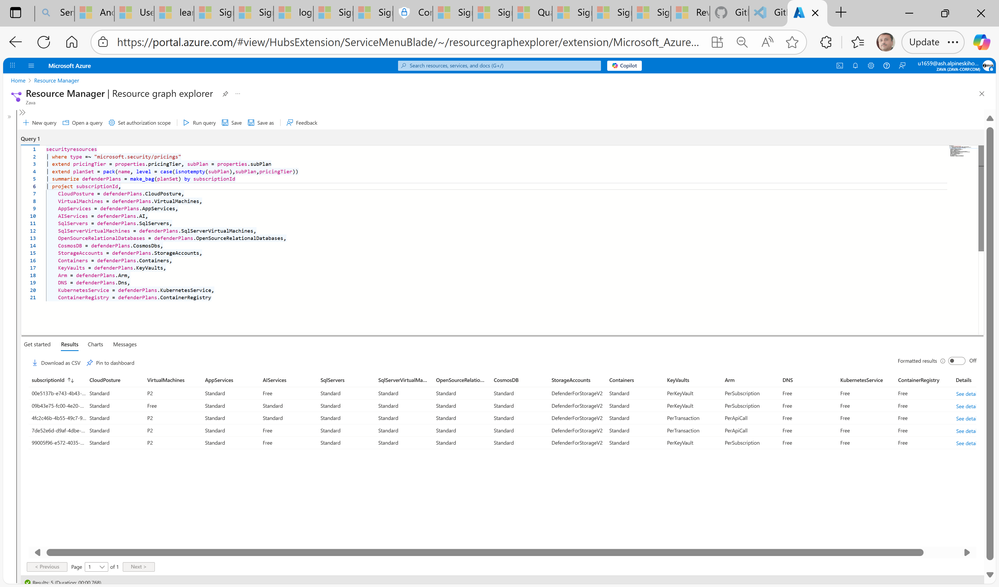
- Export results to CSV or Power BI for reporting.
- Optionally, schedule the query using Azure Automation or Logic Apps for periodic checks.
Pros
- No dependency on workbook customization.
- Flexible for ad hoc queries and automation.
Cons
- Separate reporting interface from the Coverage Workbook.
- Requires manual execution or automation setup.
Recommendation
If your organization prefers a centralized dashboard, choose Option 1 and update the Coverage Workbook. For quick checks or automation, Option 2 using Resource Graph Explorer is simpler and more scalable.