
As data workloads grow in complexity and scale, so does the need for more adaptable and performant database infrastructure. That’s why we’re excited to introduce a new capability in Azure SQL Managed Instance: Flexible Memory, now entering public preview.
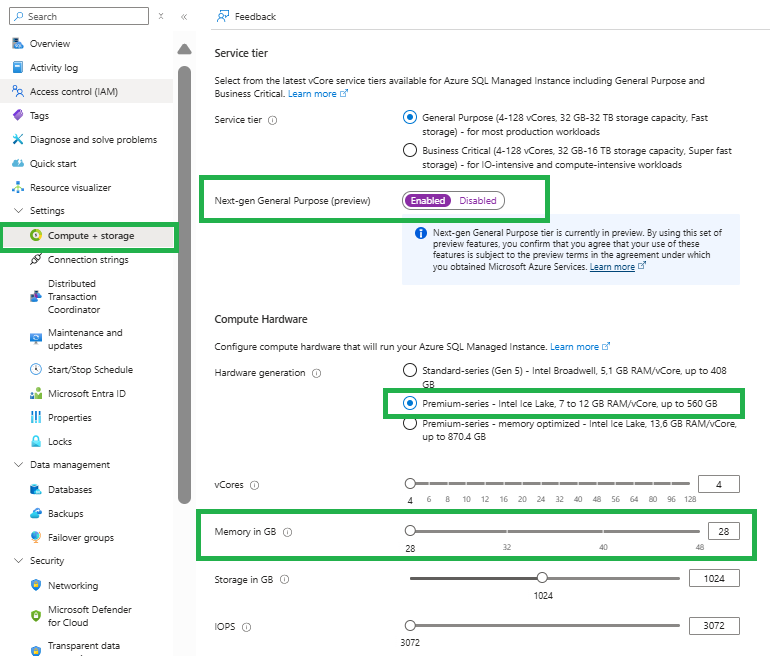
Flexible Memory allows you to customize the memory-to-vCore ratio in your SQL Managed Instance, giving you the ability to fine-tune performance and cost based on your workload needs. This feature is part of the next-generation General Purpose tier, and it introduces a memory slider that lets you scale memory independently within defined limits. The memory slider is enabled only for premium series hardware.
Traditionally, memory allocation in SQL Managed Instance was fixed per vCore. With Flexible Memory, you can now:
- Increase memory beyond the default allocation
- Optimize for memory-intensive workloads without overprovisioning compute
- Pay only for what you use — additional memory is billed per GB/hour
This flexibility is especially valuable for scenarios like analytics, caching, or workloads with large buffer pool requirements.
Memory scales based on the number of vCores and the selected hardware tier:
| Hardware Tier | Memory per vCore (GB) |
| Standard-series | 5.1 |
| Premium series | 7–12 |
| Premium series (memory-optimized) | Up to 13.6 |
You can select from predefined memory ratios (e.g., 7, 8, 10, 12 GB per vCore) depending on your configuration. For example, a 10 vCore instance can be configured with 70 GB to 120 GB of memory.
One of the most powerful aspects of the Flexible Memory feature is the ability to select from a range of memory-to-vCore ratios. These “click stops” allow you to tailor memory allocation precisely to your workload’s needs — whether you’re optimizing for performance, cost, or both. The table below outlines the available configurations for Premium Series hardware, showing how memory scales across 16 vCore sizes:
| vCores | Available Ratios | Total Memory Options (GB) |
| 4 | 7, 8, 10, 12 | 28, 32, 40, 48 |
| 6 | 7, 8, 10, 12 | 42, 48, 60, 72 |
| 8 | 7, 8, 10, 12 | 56, 64, 80, 96 |
| 10 | 7, 8, 10, 12 | 70, 80, 100, 120 |
| 12 | 7, 8, 10, 12 | 84, 96, 120, 144 |
| 16 | 7, 8, 10, 12 | 112, 128, 160, 192 |
| 20 | 7, 8, 10, 12 | 140, 160, 200, 240 |
| 24 | 7, 8, 10, 12 | 168, 192, 240, 288 |
| 32 | 7, 8, 10, 12 | 224, 256, 320, 384 |
| 40 | 7, 8, 10, 12 | 280, 320, 400, 480 |
| 48 | 7, 8, 10 | 336, 384, 480 |
| 56 | 7, 8 | 392, 448 |
| 64 | 7 | 448 |
| 80 | 7 | 560 |
| 96 | 5.83 | 560 |
| 128 | 4.38 | 560 |
Flexible Memory introduces a usage-based pricing model that ensures you only pay for the memory you actually consume beyond the default allocation. This model is designed to give you the flexibility to scale memory without overcommitting on compute resources – and without paying for unused capacity.
How it works:
- Default memory is calculated based on the minimum memory-to-vCore ratio
- Billable memory is the difference between your configured memory and the default allocation.
- Billing is per GB/hour, so you’re charged only for the additional memory used over time.
Let’s take an example of SQL Managed Instance running on premium series hardware with 4 vCores and 40GB of memory.
| Configuration | Value |
| vCores | 4 |
| Configured Memory | 40 GB |
| Default Memory (4 × 7 GB) | 28 GB |
| Billable Memory | 12 GB |
| Billing Unit | Per GB/hour |
| Charged For | 12 GB of additional memory |
Important note: Additional memory is provided free of charge until September 1st.
Changing memory behaves just like changing vCores:
- Seamless updates via Azure Portal or API
- Failover group guidance remains the same
- Upgrade secondary first
- Configurations between primary and secondary should match
Adjusting the memory is fully online operation, with a short failover at the very end of it. The operation will go through the process of allocating the new compute with specified configuration, which takes approximately 60 minutes, with new faster management operations.
API Support
Flexible Memory is fully supported via API (the minimal API version that can be used is 2024-08-01) and Azure Portal. Here’s a sample API snippet to configure memory:
{
  "properties": {
    "memorySizeInGB": 96
  }
}
Portal support
Notice: Changes in Azure portal are being rolled out. In the meantime, you can use API for trying out the feature.
The new Flexible Memory capability in Azure SQL Managed Instance empowers you to scale memory independently of compute, offering greater control over performance and cost. With customizable memory-to-vCore ratios, a transparent pricing model, and seamless integration into existing management workflows, this feature is ideal for memory-intensive workloads and dynamic scaling scenarios. Whether you’re optimizing for analytics, caching, or simply want more headroom without overprovisioning vCores, Flexible Memory gives you the tools to do it – efficiently and affordably.
Review the Documentation: Explore detailed configuration options, supported tiers, and API usage.
Management operations overview
Management operations duration
Test Your Workloads: Use the memory slider in the Azure Portal or API to experiment with different configurations.