
Hello IT Pros,
I have collected the Microsoft Defender for Endpoint (Microsoft Defender ATP) advanced hunting queries from my demo, Microsoft Demo and Github for your convenient reference. As we knew, you or your InfoSec Team may need to run a few queries in your daily security monitoring task.
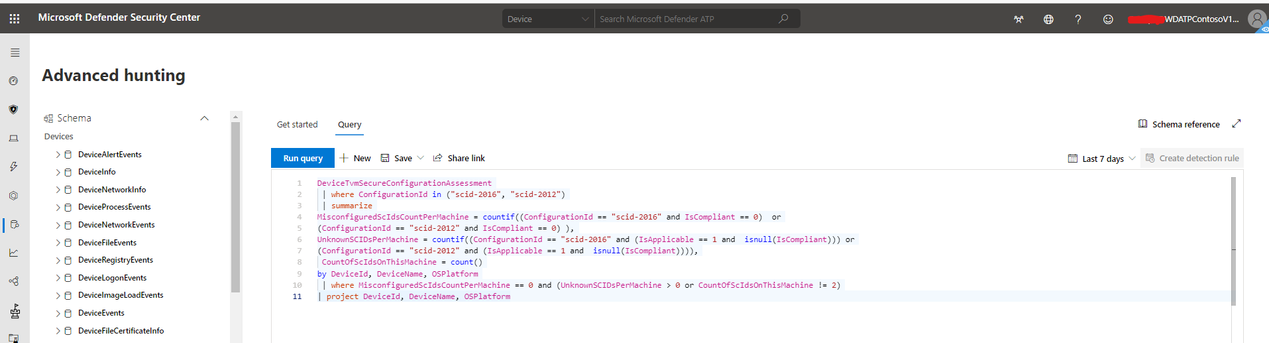
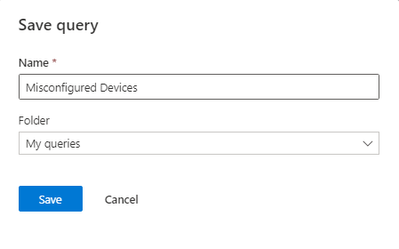
To save the query
- In Securitycenter.windows.com,
- go to Advanced hunting and create the query,
- copy and paste the content,
- save them for future re-use
| Query Purpose | Content | Note |
| Search Device Events by IP address | DeviceNetworkEvents | where RemoteIP == “52.176.49.76” | |
| List Devices with Schedule Task created by Virus | DeviceProcessEvents | where FolderPath endswith “\\schtasks.exe” and ProcessCommandLine has ” /create ” and AccountName != “system” | |
| List Device contained Virus File Name | DeviceFileEvents | where FileName == ‘Invoice.pdf.exe’ | |
| List Devices with Phising File extension (double extension) as .pdf.exe, .docx.exe, .doc.exe, .mp3.exe | DeviceProcessEvents | where Timestamp > ago(7d) | where FileName endswith “.pdf.exe” or FileName endswith “.doc.exe” or FileName contains “.docx.exe” or FileName contains “.mp3.exe” | project Timestamp, DeviceName, FileName, AccountSid, AccountName, AccountDomain | top 100 by Timestamp | |
| List Device blocked by Windows Defender ExploitGuard | DeviceEvents | where ActionType =~ “ExploitGuardNetworkProtectionBlocked” | summarize count(RemoteUrl) by InitiatingProcessFileName, RemoteUrl,Audit_Only=tostring(parse_json(AdditionalFields).IsAudit) | sort by count_RemoteUrl desc | |
| List All Files Create during the last hour | DeviceFileEvents | where Timestamp > ago(1h) | project FileName, FolderPath, SHA1, DeviceName, Timestamp | limit 1000 | |
| List Device who has a specific File Hash | DeviceFileEvents | where SHA1 == “4aa9deb33c936c0087fb05e312ca1f09369acd27” | |
| List IP address blocked by FW rule | DeviceEvents | where ActionType in (“FirewallOutboundConnectionBlocked”, “FirewallInboundConnectionBlocked”, “FirewallInboundConnectionToAppBlocked”) | project DeviceId , Timestamp , InitiatingProcessFileName , InitiatingProcessParentFileName, RemoteIP, RemotePort, LocalIP, LocalPort | summarize MachineCount=dcount(DeviceId) by RemoteIP | top 100 by MachineCount desc | |
| Look for public the IP addresses of devices that failed to logon multiple times, using multiple accounts, and eventually succeeded. | DeviceLogonEvents | where isnotempty(RemoteIP) and AccountName !endswith “$” and RemoteIPType == “Public” | extend Account=strcat(AccountDomain, “\\”, AccountName) | summarize Successful=countif(ActionType == “LogonSuccess”), Failed = countif(ActionType == “LogonFailed”), FailedAccountsCount = dcountif(Account, ActionType == “LogonFailed”), SuccessfulAccountsCount = dcountif(Account, ActionType == “LogonSuccess”), FailedAccounts = makeset(iff(ActionType == “LogonFailed”, Account, “”), 5), SuccessfulAccounts = makeset(iff(ActionType == “LogonSuccess”, Account, “”), 5) by DeviceName, RemoteIP, RemoteIPType | where Failed > 10 and Successful > 0 and FailedAccountsCount > 2 and SuccessfulAccountsCount == 1 | From WD ATP Demo |
| Look for machines failing to log-on to multiple machines or using multiple accounts | // Note – RemoteDeviceName is not available in all remote logon attempts DeviceLogonEvents | where isnotempty(RemoteDeviceName) | extend Account=strcat(AccountDomain, “\\”, AccountName) | summarize Successful=countif(ActionType == “LogonSuccess”), Failed = countif(ActionType == “LogonFailed”), FailedAccountsCount = dcountif(Account, ActionType == “LogonFailed”), SuccessfulAccountsCount = dcountif(Account, ActionType == “LogonSuccess”), FailedComputerCount = dcountif(DeviceName, ActionType == “LogonFailed”), SuccessfulComputerCount = dcountif(DeviceName, ActionType == “LogonSuccess”) by RemoteDeviceName | where Successful > 0 and ((FailedComputerCount > 100 and FailedComputerCount > SuccessfulComputerCount) or (FailedAccountsCount > 100 and FailedAccountsCount > SuccessfulAccountsCount)) | From WD ATP Demo |
| List all devices named start with prefix FC- | DeviceInfo | where DeviceName startswith “FC-“ | |
| List Windows Defender Scan Actions completed or Cancelled | DeviceEvents | where ActionType in (“AntivirusScanCompleted”, “AntivirusScanCancelled”) | extend A=parse_json(AdditionalFields) | project Timestamp, DeviceName, ActionType,ScanType = A.ScanTypeIndex, StartedBy= A.User | sort by Timestamp desc | |
| List Devices access to bad URL | DeviceNetworkEvents | where RemoteUrl == “www.advertising.com” | project Timestamp, DeviceName, ActionType, RemoteIP, RemoteUrl, InitiatingProcessFileName, InitiatingProcessCommandLine | |
| List All URL access by a Device named contained the word FC-DC | DeviceNetworkEvents | where RemoteUrl != “www.advertising.com” and DeviceName contains “fc-dc” | project Timestamp, DeviceName, ActionType, RemoteIP, RemoteUrl, InitiatingProcessFileName, InitiatingProcessCommandLine |
Github Advanced Hunting Cheat Sheet:
| Query Purpose | Query Content | Notes |
| Find endpoints communicating to a specific domain. Author: @maarten_goet | let Domain = “http://domainxxx.com”; DeviceNetworkEvents | where Timestamp > ago(7d) and RemoteUrl contains Domain | project Timestamp, DeviceName, RemotePort, RemoteUrl | top 100 by Timestamp desc | “let” is the command to introduce variables. Variable name: “Domain” with value: “http://domainxxx.com” |
| Finds PowerShell execution events that could involve a download. Author: @MicrosoftMTP | union DeviceProcessEvents, DeviceNetworkEvents | where Timestamp > ago(7d) | where FileName in~ (“powershell.exe”, “powershell_ise.exe”) | where ProcessCommandLine has_any(“WebClient”, “DownloadFile”, “DownloadData”, “DownloadString”, “WebRequest”, “Shellcode”, “http”, “https”) | project Timestamp, DeviceName, InitiatingProcessFileName, InitiatingProcessCommandLine, FileName, ProcessCommandLine, RemoteIP, RemoteUrl, RemotePort, RemoteIPType | top 100 by Timestamp | “union” is the command to combine multiple Device Query Tables |
| Find scheduled tasks created by a non-system account Author: @maarten_goet | DeviceProcessEvents | where FolderPath endswith “\\schtasks.exe” and ProcessCommandLine has “/create” and AccountName != “system” | where Timestamp > ago(7d) | |
| Find possible clear text passwords in Windows registry. Author: @MicrosoftMTP | DeviceRegistryEvents | where ActionType == “RegistryValueSet” | where RegistryValueName == “DefaultPassword” | where RegistryKey has @”SOFTWARE\Microsoft\Windows NT\CurrentVersion\Winlogon” | project Timestamp, DeviceName, RegistryKey | top 100 by Timestamp | |
| Lookup process executed from binary hidden in Base64 encoded file. Author: @MicrosoftMTP | DeviceProcessEvents | where Timestamp > ago(14d) | where ProcessCommandLine contains “.decode(‘base64’)” or ProcessCommandLine contains “base64 –decode” or ProcessCommandLine contains “.decode64(” | project Timestamp , DeviceName , FileName , FolderPath , ProcessCommandLine , InitiatingProcessCommandLine top 100 by Timestamp | |
| Search for applications who create or update an 7Zip or WinRAR archive when a password is specified. Author: @PowershellPoet | DeviceProcessEvents | where ProcessCommandLine matches regex @”\s[aukfAUKF]\s.*\s-p” | extend SplitLaunchString = split(ProcessCommandLine, ‘ ‘) | where array_length(SplitLaunchString) >= 5 and SplitLaunchString[1] in~ (‘a’,’u’,’k’,’f’) | mv-expand SplitLaunchString | where SplitLaunchString startswith “-p” | extend ArchivePassword = substring(SplitLaunchString, 2, strlen(SplitLaunchString)) | project-reorder ProcessCommandLine, ArchivePassword | -p is the password switch and is immediately followed by a password without a space |
More query tips directly provided by MD for Endpoint – Device Timeline \ Hunt for related Event
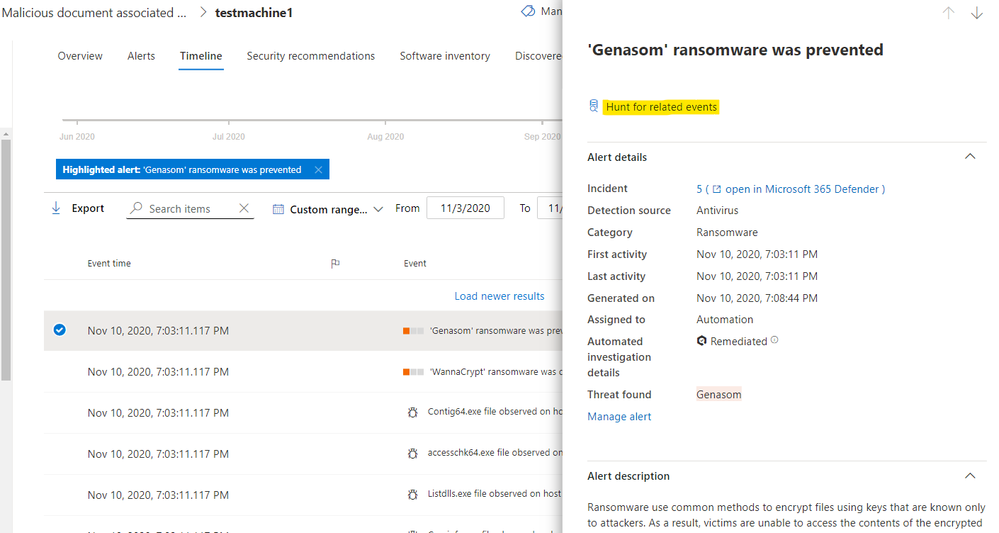
| Query for Event happened 30 minutes before and after an attack, showing result as “selected event” (the attack event itself), “earlier event” and “later event” | let selectedEventTimestamp = datetime(2020-11-10T19:03:11); search in (DeviceFileEvents, DeviceProcessEvents, DeviceEvents, DeviceRegistryEvents, DeviceNetworkEvents, DeviceImageLoadEvents, DeviceLogonEvents, ResponseEvents)Timestamp between ((selectedEventTimestamp – 30m) .. (selectedEventTimestamp + 30m))and DeviceId == “f2606c4a7d6c275040937820dc0fcc9ba694549e”| sort by Timestamp desc| extend Relevance = iff(Timestamp == selectedEventTimestamp, “Selected event”, iff(Timestamp < selectedEventTimestamp, “Earlier event”, “Later event”))| project-reorder Relevance |

For all M365 Security Queries:
You could get the queries’ contents from Github link here.
Reference:
- https://docs.microsoft.com/en-us/azure/data-explorer/kusto/query/agofunction
- https://docs.microsoft.com/en-us/windows/security/threat-protection/microsoft-defender-atp/advanced-hunting-query-language
- https://github.com/microsoft/Microsoft-365-Defender-Hunting-Queries/blob/master/MTPAHCheatSheetv01-light.pdf
Disclaimer The sample scripts are not supported under any Microsoft standard support program or service. The sample scripts are provided AS IS without warranty of any kind. Microsoft further disclaims all implied warranties including, without limitation, any implied warranties of merchantability or of fitness for a particular purpose. The entire risk arising out of the use or performance of the sample scripts and documentation remains with you. In no event shall Microsoft, its authors, or anyone else involved in the creation, production, or delivery of the scripts be liable for any damages whatsoever (including, without limitation, damages for loss of business profits, business interruption, loss of business information, or other pecuniary loss) arising out of the use of or inability to use the sample scripts or documentation, even if Microsoft has been advised of the possibility of such damages.
Updated Nov 09, 2023
Version 18.0