
In today’s multi-modal communication landscape, both humans and AI agents can interact across multiple sessions—via chat, voice, or other communication channels. Managing those user sessions securely and consistently has been a challenge when using short-lived, ephemeral identities. Azure Communication Services (ACS) now solves that with Identities with Custom IDs.
This new feature allows developers to associate ACS-generated identities with custom application-defined identifiers (like emails or usernames). These custom identifiers make it easy to recognize and reuse an ACS user identity across multiple sessions — enabling smoother experiences, stronger data consistency, and more intelligent engagement across the entire customer journey.
💡 With Custom IDs, developers can now unlock deeper intelligence across customer journeys — from onboarding to support to re-engagement — all powered by consistent identity data. Imagine a telehealth platform where patients log in using their email addresses. Previously, developers had to build and maintain a custom mapping layer to associate those emails with ACS identities. Now, with Custom IDs, that mapping is handled automatically—developers can use the email (or any custom identifier) directly using the customId attribute when creating an Identity, and ACS ensures it consistently maps to the same ACS-generated identity across sessions.
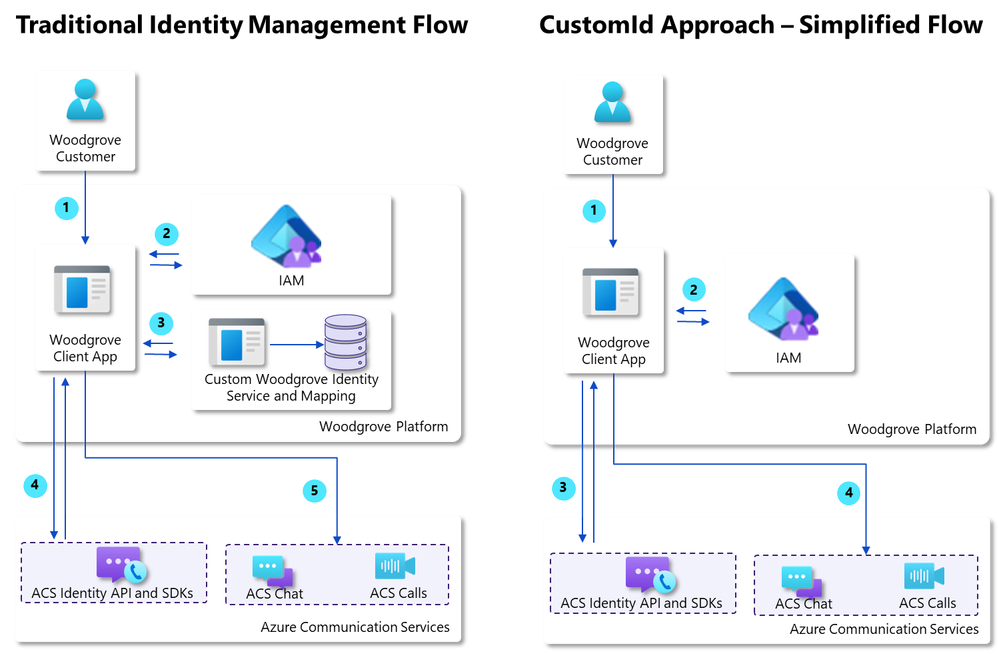
The diagram compares two approaches to identity management in Azure Communication Services:
- Authentication Initiation – The customer starts the process by logging into the Woodgrove Client App.
- Token Retrieval – The client app authenticates the user and retrieves a secure token from the Identity and Access Management system (IAM).
- Identity Mapping – The client app sends an identifier to a back-end identity mapping service, which maps such identifier to an ACS identity.
- ACS Token Retrieval – The client app obtains an ACS authentication token from the IAM for the mapped ACS identity.
- Start communication – The client app uses the ACS token to start communication through the different services (chat, calling, etc.)
This traditional flow requires the app to manage ACS identity creation and short-lived identifiers for each session.
- Authentication Initiation – The customer starts the process by logging into the Woodgrove Client App.
- Token Retrieval – The client app authenticates the user and retrieves a secure token from the Identity and Access Management system (IAM).
- ACS Token creation with custom Id – The client app creates an authentication token using the custom Id and gets an access token for a consistent ACS identity.
- Start communication – The client app uses the ACS token to start communication through the different services (chat, calling, etc.)
This flow eliminates the need to manage ACS identity mapping or short-lived identifiers for each session.
//Authenticate the client
var client = new CommunicationIdentityClient(connectionString);

// Alphanumeric custom ID
string customId = "alice@contoso.com";

// Create Access Tokens with using an Identity with Custom Id
var userAndTokenResponse = await client.CreateUserAndTokenAsync(scopes: new[] { CommunicationTokenScope.Chat }, customId: customId);
var user = userAndTokenResponse.Value.User;
Console.WriteLine($"nUser ID: {user.Id}");

// Create another token with the same customId and validate that the same user is returned
var userAndTokenResponse2 = await client.CreateUserAndTokenAsync(scopes: new[] { CommunicationTokenScope.Chat }, customId: customId);
var user2 = userAndTokenResponse2.Value.User;
Console.WriteLine($"nUser ID (second call): {user2.Id}");

// Validate they are the same
Debug.Assert(user.Id == user2.Id);
This confirms that custom IDs map consistently to the same durable ACS identity.
🔄 Repeated calls with alice@contoso.com return the same ACS user ID — demonstrating the reliability of Identities with Custom ID.
🔐 Custom IDs are handled securely and are never exposed beyond your own app’s context, ensuring that identity data remains protected and private.
📌 Explore the sample code and documentation to get started: Identity model, JS SDK, .NET SDK, QuickStart.