
As organizations modernize their identity infrastructure, Microsoft Entra’s Group Source of Authority (SOA) Conversion feature enables a granular migration of group management from on-premises AD to Microsoft Entra ID without disabling sync or rearchitecting the entire directory.
Group SOA defines where a group object is mastered either in on-prem AD or in Entra ID. With SOA conversion, administrators can selectively convert AD-synced groups into cloud-native groups, making them editable and governable directly in Entra ID.
To perform SOA conversion, the following Microsoft Entra roles and Graph API permissions are required:
- Hybrid Administrator: Required to call Microsoft Graph APIs to read and update SOA of groups.
- Application Administrator or Cloud Application Administrator: Required to grant user consent to the app or Graph Explorer.
Graph API Permission Scope:
- Group-OnPremisesSyncBehavior.ReadWrite.All must be granted to the app calling the onPremisesSyncBehavior endpoint.
Before initiating SOA conversion, ensure the following:
Licensing
- Microsoft Entra Free or Basic license is sufficient.
Sync Clients
- Microsoft Entra Connect Sync: Minimum version 2.5.76.0
- Microsoft Entra Cloud Sync: Minimum version 1.1.1370.0
Group Eligibility
- Groups must not be mail-enabled or tied to Exchange on-premises (DLs or MESGs).
- If provisioning back to AD is planned, change group scope to Universal.
Here’s a simplified step-by-step guide:
- Identify Target Groups
- Use Entra Admin Center or Graph Explorer to list synced groups.
- Confirm they are not Exchange-dependent.
- Grant Permissions
- Use Graph Explorer or your app registration to grant Group-OnPremisesSyncBehavior.ReadWrite.All.
- Execute SOA Conversion
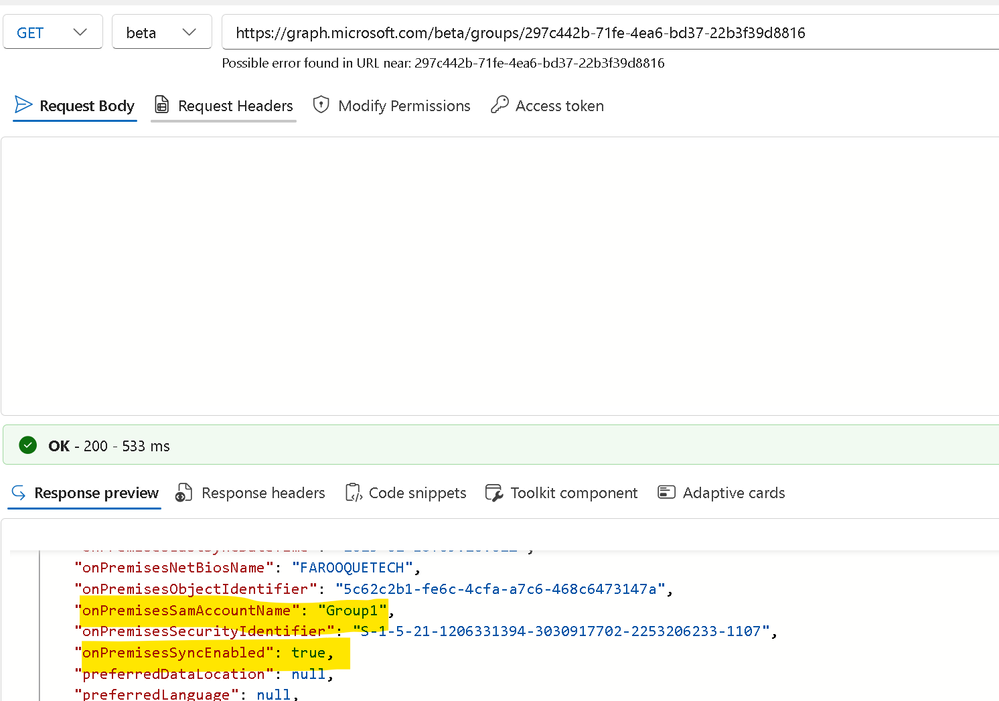
If we see Group1, which is in scope of conversion is synchronized from on-prem.
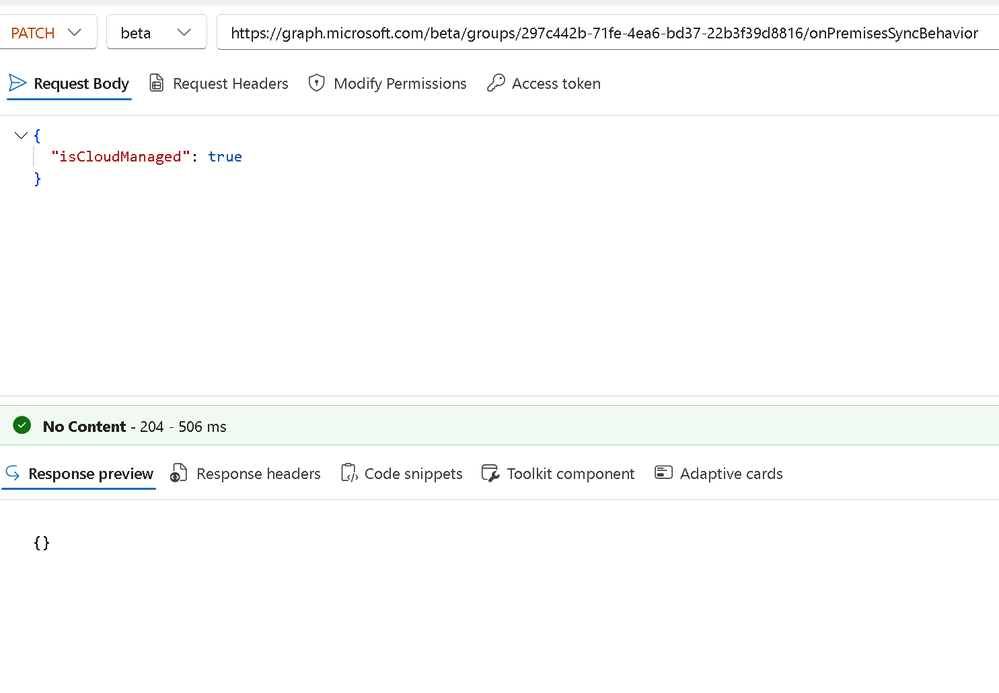
Execute the below from Graph Explorer to convert “Group1” to cloud managed
PATCH https://graph.microsoft.com/beta/groups/{group-id}/OnPremisesSyncbehavior
{
“isCloudManaged”: true
}
We can verify the change by executing below query on Graph API Explorer
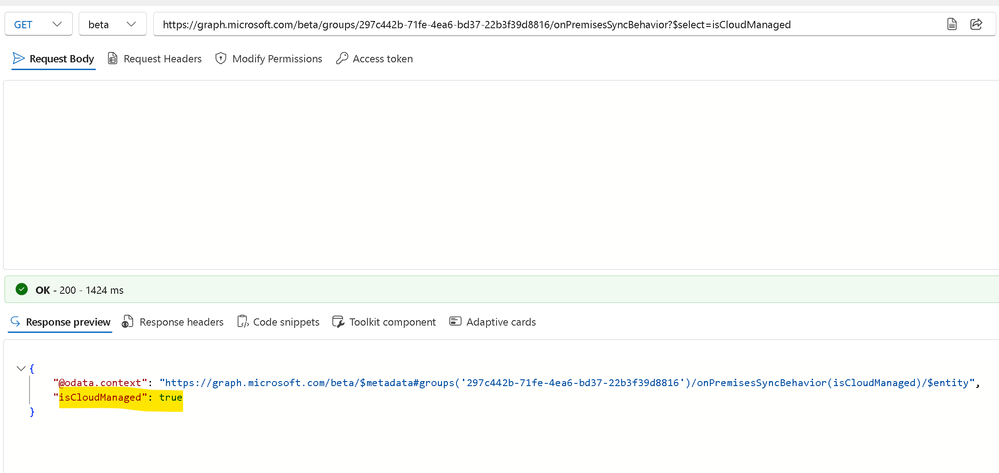
This marks the group as cloud-managed. AD sync will stop honoring changes to this group.
- Validate Conversion
- Confirm blockOnPremisesSync = true in the Entra Admin Center.
- Use audit logs to verify the change.
- Apply Governance
- Apply lifecycle policies, access reviews, and provisioning rules using Entra ID Governance.
Scenario: A customer has migrated all mailboxes to Exchange Online and no longer needs certain AD groups.
Solution: Convert those groups to cloud-native Entra ID groups and delete them from AD, reducing footprint and simplifying governance.
Scenario: A customer uses AD security groups to secure on-prem apps (e.g., Kerberos-based apps).
Solution: Convert the group SOA to Entra ID, apply governance policies, and use Group Provision to AD to sync cloud-managed groups back to AD.
Scenario: A customer wants to migrate all distribution lists and mail-enabled security groups to the cloud.
Solution: Convert SOA to Entra ID, recreate mail-enabled groups in Exchange Online, and decommission AD-based mail groups.
Scenario: A federal customer wants to run access reviews on group memberships but the groups are AD-synced.
Solution: Convert SOA to Entra ID, enabling full access review capabilities and lifecycle workflows.
Scenario: A customer is migrating from Entra Connect Sync to Cloud Sync and wants to clean up group sprawl.
Solution: Use SOA conversion to move group management to the cloud, then decommission legacy sync rules and OUs.
Group SOA Conversion is more than a technical enhancement, it’s a strategic enabler for identity modernization. It supports:
- AD DS minimization: Shrinking on-prem footprint.
- Cloud-first governance: Centralized access control and lifecycle management.
- Phased migration: Avoiding disruption while modernizing.