
Overview
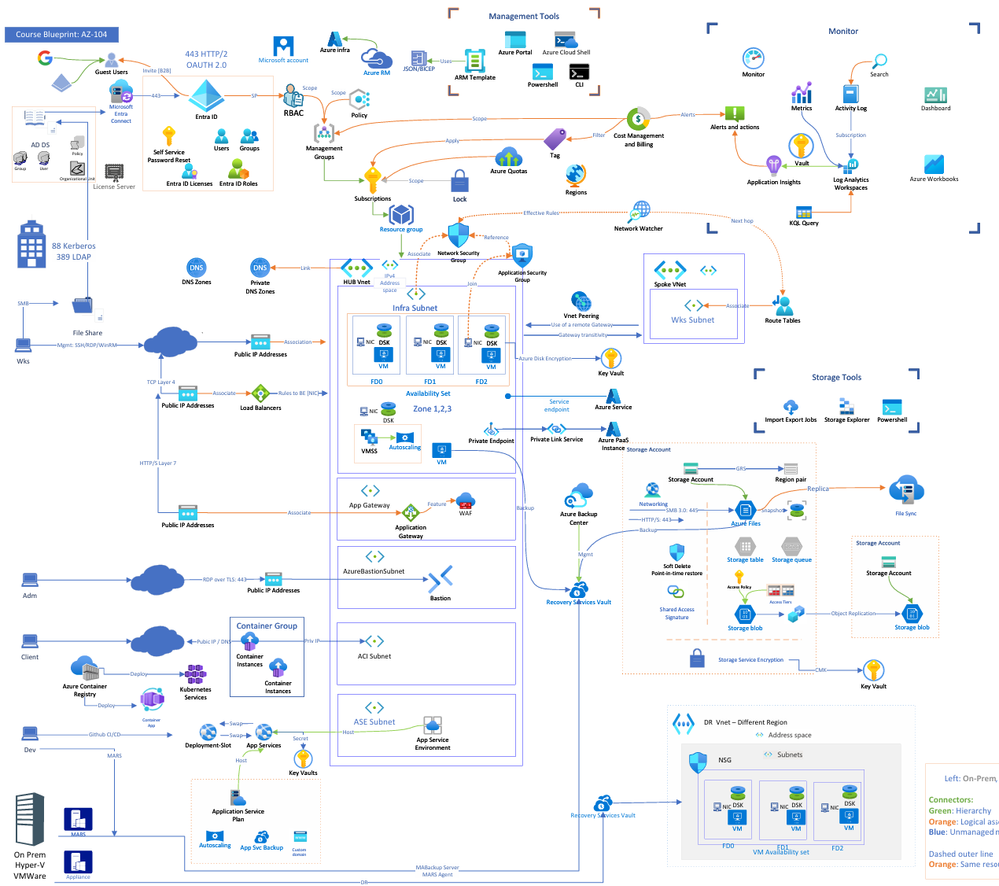
The Course Blueprint is a comprehensive visual guide to the Azure ecosystem, integrating all the resources, tools, structures, and connections covered in the course into one inclusive diagram. It enables students to map out and understand the elements they’ve studied, providing a clear picture of their place within the larger Azure ecosystem. It serves as a 1:1 representation of all the topics officially covered in the instructor-led training. Formats available include PDF, Visio, Excel, and Video.
Links:
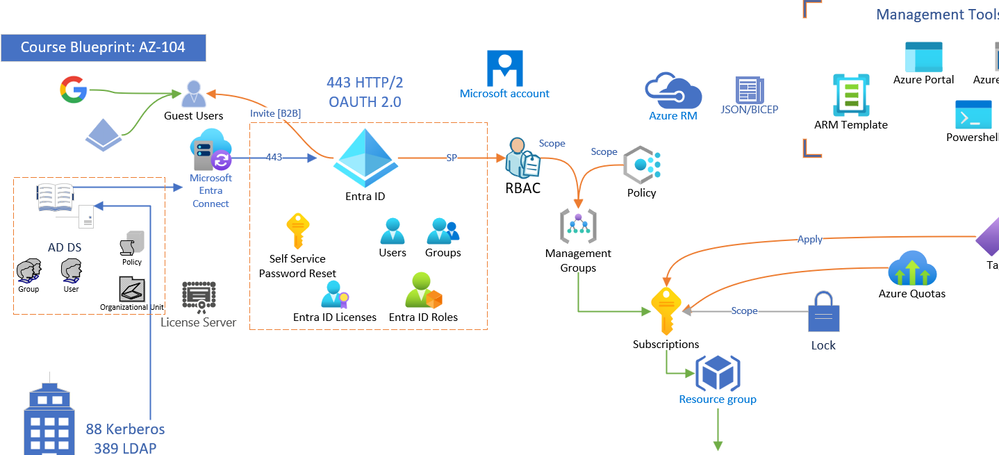
Each icon in the blueprint has a hyperlink to the pertinent document in the learning path on Learn.
Layers:
You have the capability to filter layers to concentrate on segments of the course by modules.
I.E.: Just day 1 of AZ-104, using filters in Visio and selecting modules 1-3
Integration:
The Visio Template+ for expert courses like SC-100 and AZ-305 includes an additional layer that enables you to compare SC-100, AZ-500, and SC-300 within the same diagram. Similarly, you can compare any combination of AZ-305, AZ-700, AZ-204, and AZ-104 to identify differences and study gaps. Since SC-300 and AZ-500 are potential prerequisites for the expert certification associated with SC-100, and AZ-204 or AZ-104 for the expert certification associated with AZ-305, this comparison is particularly useful for understanding the extra knowledge or skills required to advance to the next level.
Advantages for Students
- Defined Goals: The blueprint presents learners with a clear vision of what they are expected to master and achieve by the course’s end.
- Focused Learning: By spotlighting the course content and learning targets, it steers learners’ efforts towards essential areas, leading to more productive learning.
- Progress Tracking: The blueprint allows learners to track their advancement and assess their command of the course material.
- Topic List: A comprehensive list of topics for each slide deck is now available in a downloadable .xlsx file. Each entry includes a link to Learn and its dependencies.
Download links
| Associate Level | Visio | Contents | Video Overview | |
| AZ-104 Azure Administrator Associate R: 12/14/2023 U: 04/16/2025 | Visio | Excel | Mod 01 | |
| AZ-204 Azure Developer Associate R: 11/05/2024 U: 11/11/2024 | Visio | Excel | ||
| AZ-500 Azure Security Engineer Associate R: 01/09/2024 U: 10/10/2024 | Visio+ | Excel | ||
| AZ-700 Azure Network Engineer Associate R: 01/25/2024 U: 11/04/2024 | Visio | Excel | ||
| SC-200 Security Operations Analyst Associate R: 04/03/2025 U:04/09/2025 | Blueprint | Visio | Excel | |
| SC-300 Identity and Access Administrator Associate R: 10/10/2024 | Excel | |||
| Specialty | Visio | |||
| AZ-140 Azure Virtual Desktop Specialty R: 01/03/2024 U: 02/27/2025 | Visio | Excel | ||
| Expert level | Visio | |||
| AZ-305 Designing Microsoft Azure Infrastructure Solutions R: 05/07/2024 U: 02/05/2025 | Visio+ AZ-104 AZ-204 AZ-700 AZ-140 | Excel | ||
| SC-100 Microsoft Cybersecurity Architect R: 10/10/2024 U: 04/09/2025 | Visio+ AZ-500 | Excel | ||
| Skill based Credentialing | ||||
| AZ-1002 Configure secure access to your workloads using Azure virtual networking R: 05/27/2024 | Visio | Excel | ||
| AZ-1003 Secure storage for Azure Files and Azure Blob Storage R: 02/07/2024 U: 02/05/2024 | Excel |
Benefits for Trainers:
Trainers can follow this plan to design a tailored diagram for their course, filled with notes. They can construct this comprehensive diagram during class on a whiteboard and continuously add to it in each session. This evolving visual aid can be shared with students to enhance their grasp of the subject matter.
Explore Azure Course Blueprints! | Microsoft Community Hub
Visio stencils Azure icons – Azure Architecture Center | Microsoft Learn
AZ-104 Overview of Mod 01 using Azure Course Blueprint
[embedded content]
___
Subscribe if you want to get notified of any update like new releases or updates.
My email ilan.nyska@microsoft.com
LinkedIn https://www.linkedin.com/in/ilan-nyska/
In 2024, I launched the Azure Course Blueprints — a visual learning companion to Microsoft Learn courses. Since then, they’ve been downloaded over 60,000 times and used by learners, trainers, and teams around the world.
I’ve received so many kind messages, thank-you notes, and reshares — and I’m truly grateful. But here’s the reality:
💬 The only thing I can use internally to justify continuing this project is your engagement — through this survey
https://lnkd.in/gnZ8v4i8
⏳ Unless I receive enough support via this short survey, the project will be sunset.
👉 If these resources have helped you or your team, please take 2 minutes to fill out the survey.
📣 And if you know someone who’s benefited from the blueprints or could help on this quest — please reshare this post.
Thank you for being part of this journey — and for helping shape the future of Azure learning.
Please consider sharing your anonymous feedback <-->
Thank you for your support!
-->